Appearance
Design spec
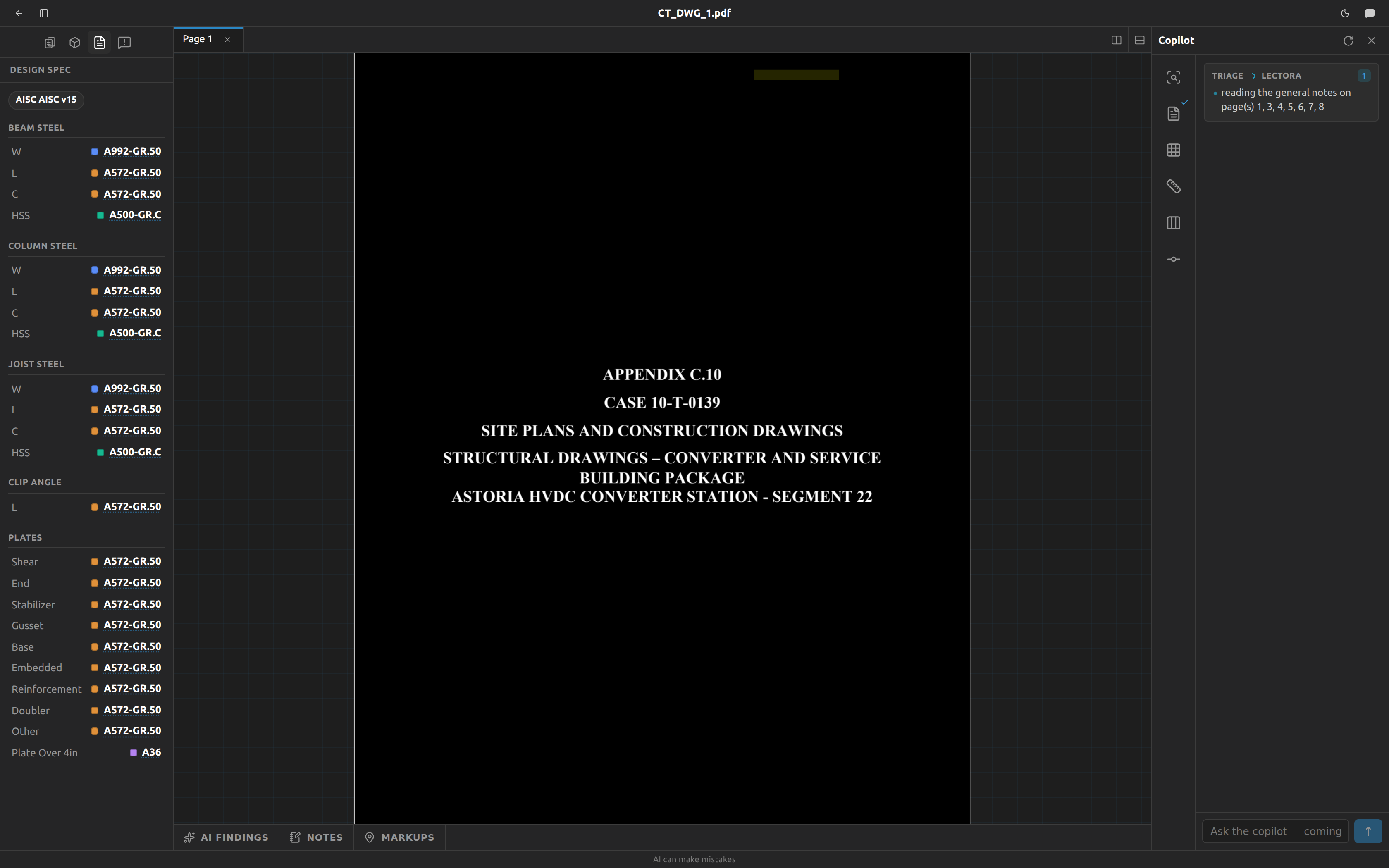
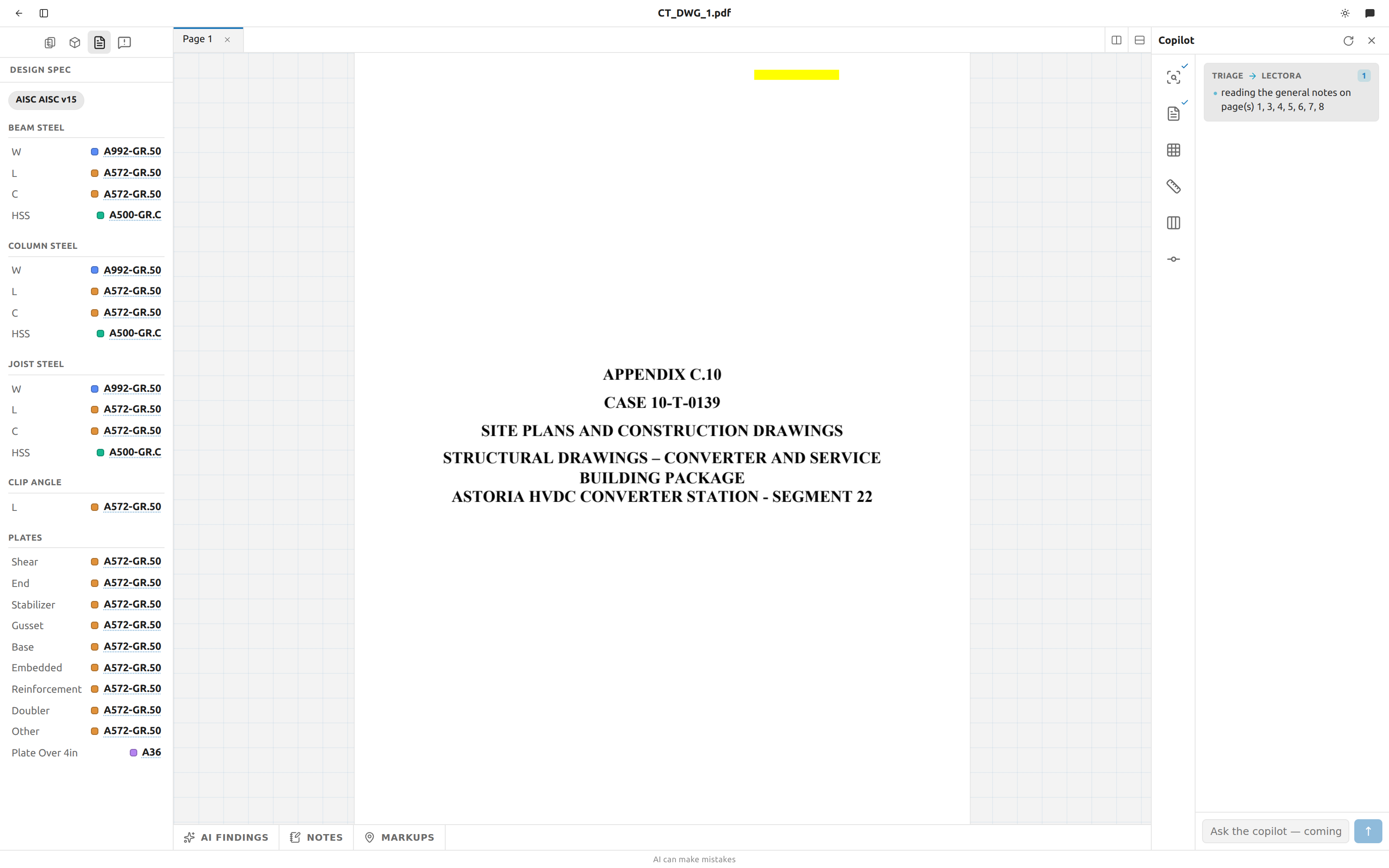
The Design spec panel is the general notes, read once and laid out as a table: the steel grades, bolt and weld defaults, and the AISC design values that apply across the whole job. It is filled by Lectora, the reading stage, which runs automatically the moment you upload a drawing set — you never start it by hand.
Open the panel
- In the workspace sidebar, click the document icon — its tooltip reads
Design spec. - The panel opens with the header Design Spec.
The panel is live. Lectora writes partial results while it is still reading, so rows appear as they are found, and the finished spec lands without a refresh.
What the panel says while it works
Two states replace the table entirely, because there is nothing to correct while a read is in flight:
| You see | What it means |
|---|---|
Loading… | The panel is still fetching. Momentary. |
Reading the general notes… | Lectora is running. Rows will appear as it goes. |
Every other state shows the table, with a note above it saying what happened:
| Note above the table | What it means |
|---|---|
Lectora hasn’t read the general notes yet. | The read is queued behind triage. |
No general-notes pages on this set. | Triage found no general-notes sheet, so there was nothing to read. |
Couldn’t read the general notes. | The read failed. Re-run Lectora from the copilot. |
In all three the table is empty but editable — every grade reads Not stated and you can fill any of them in. That is the point: a set whose notes are missing or unreadable still has a design spec, you just have to state it yourself. See Correct a value Lectora got wrong.
An empty spec is not harmless
The grade a member gets is read from this panel when a scene is committed. If the spec is empty, every member commits with no grade and each one raises a member missing grade RFI. Filling the spec in first is what avoids that.
Why "no general-notes pages" happens
Lectora only reads sheets that triage classified as general notes, and it reads the PDF text layer — there is no OCR. A notes page that is a scanned image carries no text to quote, so the read comes back empty rather than guessing. The spec is still yours to state by hand.
Read the spec
Sections render top to bottom in a fixed order. A section with nothing in it is not shown at all — an empty table would only be noise. Detailing is the exception: it always has a value, so it is always there.
| # | Section | What it holds |
|---|---|---|
| 1 | Beam steel | One steel grade per AISC shape family, for shapes used as beams: W, L, S, 2L, M, HP, C, MC, WT, ST, MT, HSS. |
| 2 | Column steel | The same twelve shape families, for shapes used as columns. |
| 3 | Joist steel | The same twelve shape families, for joists. |
| 4 | Clip angle | Two fields only — L and 2L — the grade for connection angles. |
| 5 | Plates | A grade per plate function: Shear, End, Stabilizer, Gusset, Base, Embedded, Reinforcement, Doubler, Other, High Strength, Plate Over 4in. |
| 6 | Bolts | Grade (A325, A490, A307, F3125), Diameter (as written on the sheet), Connection Type (bearing, slip-critical, pretensioned, snug-tight), Hole Type (standard, oversized, short-slotted, long-slotted). |
| 7 | Welds | Welding Code (AWS D1.1, AWS D1.3, AWS D1.8), Electrode (E60XX, E70XX, E80XX), Min Fillet Weld Size (as written), Weld Process. |
| 8 | Detailing | Cut Offset — the erection clearance between a beam's end and the face of its support. Defaults to 1/2". |
Grades come from a closed list of 37 ASTM designations — A36, A992, A572-GR.50, A500-GR.B, A913-65, A1085 and the rest. They are spelled exactly as Tekla's US Imperial material catalog spells them, so a committed member arrives in the model as real steel rather than an undefined material. A grade the notes state that is not on the list is left out rather than moved to the nearest one that is.
Where the blanket "all other shapes" line goes
A note reading ALL OTHER SHAPES SHALL BE A36 is applied to every shape family the notes did not grade individually — it never overwrites a family the notes named directly. A role-scoped catch-all such as JOIST STEEL SHALL BE A572 fills only that role's section. Other under Plates is the same idea for plates: the grade for any structural plate whose function the notes did not call out.
Clip angles when the notes say several things
An angle can be graded as a connection angle, as a brace, or generically. The Clip angle section prefers them in that order: connection, then brace, then an untagged statement, then miscellaneous.
Set the cut offset
Steel does not reach the line it is drawn to, and it stops short twice over.
It stops at the face of whatever it frames into — the flange of a column, the web of a girder — which is the support's own steel and is nothing you have to tell Fablnx: it knows the section and which way it is turned, and works the face out per end. Then it stops a little short of that, by the erection clearance a fitter needs to swing the piece into place. Half an inch is the standard.
Detailing → Cut Offset is that clearance — the gap between the beam's end and the support's face, not the whole distance back to the grid line. It is the one row in the panel that nothing on the drawing states — the general notes say what the steel is, and the clearance is your fabricator's standard — so it never reads Not stated. It shows 1/2" until you say otherwise, and the tooltip says The standard. Nobody has stated one for this job.
To change it:
- Hover the row and click the pencil, as for a grade.
- Type the setback the way a drawing writes it —
1/2",3/4",1". - Press Enter, or click away. Esc cancels.
It is a dimension, not a grade, so there is no list to pick from — and a bare number is refused. 0.5 is half of something the field does not name; write 1/2".
Once you have set it, the row is marked with the pencil like any other correction, and the undo arrow puts it back to 1/2".
The setback is applied when you push, not when you edit
Changing it does not move steel already in Tekla. The next push of a sheet cuts that sheet's beams by whatever the spec says at that moment, so a sheet you pushed before the change keeps the old setback until you push it again.
What Tekla actually receives
The beam's ends are not moved. Fablnx sends the work points — the grid crossings the drawing frames the beam to — and, for each end, what that end frames into. Tekla then applies a real connection to the pair: it sets the beam back from the face, cuts the end, copes it around a girder's flange, and adds the plate and the bolts. Where the steel stops is a result of that connection rather than a number Fablnx subtracts.
That means the beam's reference line still runs from grid line to grid line in the model, so you can measure from the grid, while the steel itself stops short at both ends. Columns are never cut: a column runs to the elevations it was sighted at, and a splice is a different detail.
The line is at your top of steel, and the beam hangs from it. The elevation sent is the one the drawing states — the top of the section, not its middle — and Tekla is told to put the beam's top face on it. So the top of steel stays where the drawing put it even if you swap the section in Tekla for a deeper one, and a sloping beam's top surface follows the line it was framed to.
The two ends are usually different numbers. A beam running from a column to a girder is held out about seven and a half inches at the column — half the column's depth, plus your clearance — and about two thirds of an inch at the girder, because there it stops at the girder's web and its own flanges are coped around the girder's. That is the same arithmetic a detailer does, and it is why the clearance alone was never the answer.
An end that frames into nothing is left on the grid line. A cantilever tip has no support to stand clear of, so it is not cut at all — and neither is an end whose support has a section Fablnx cannot size, such as a double angle. The clearance measures a gap to something; with nothing there, there is no gap to measure.
A sloping beam gets the same clearance top and bottom. Its end is cut plumb — vertical, parallel to the face it frames to — so your half inch is half an inch at the top flange and half an inch at the bottom one, which is what a checker measures. A beam cut square across itself could not do that: on a roof pitch its end tilts with it, so one corner would dig into the column and the other would stand depth × slope too far off — an inch across a W12 at 1 in 12, four inches at 4 in 12. The setback itself is unchanged by the slope; the section's depth does not come into it at all.
A beam arriving at an angle in plan is held out further, and by more than you might expect. The end is plumb but still square across the beam in plan, so at a skew the corner nearest the support reaches the steel before the middle of the end does — and it is that corner that has to keep your clearance. On a wide beam at a shallow angle this adds inches.
That leaves a wedge-shaped gap at a skew end, opening sideways away from the near corner. That is what a square-in-plan end does; closing it means bevelling the end, which is part of a connection rather than of the beam.
Read the design version and method
Above the sections sit up to two chips: the AISC manual edition and the design method.
- The version chip is drawn from
AISC v14,AISC v15orAISC v16— the 14th, 15th and 16th editions of the Steel Construction Manual (AISC 360-10, 360-16 and 360-22). - The method chip reads
ASDorLRFD, on its own.
The version chip reads AISC twice
The value already begins with "AISC" and the panel adds another one, so the chip on screen reads AISC AISC v15, not AISC v15. Read past the duplicate — the edition itself is correct.
Neither chip is clickable, so there is no way to jump to the line the edition or method was read from, even though the source line was recorded.
Jump to the source line
- Click any value in the table.
- The general-notes page it came from opens, and the exact sentence is highlighted — in the same colour as the value's swatch.
- The highlight fades after five seconds. It is there to point, and once you are reading the sentence the page underneath is what you came for. Click the value again to bring it back.
A row is clickable only if Lectora quoted a verbatim source line for it. You can tell which by hovering:
| Row | Behaviour |
|---|---|
| Has a quoted source line | Tooltip Open the source page and highlight this. Clicking opens the page and highlights the text. |
| Has no quoted source line | The row is disabled. Clicking does nothing at all — no page, no message. |
A click that seems to do nothing
Two different rows both look inert on click: one that has no source line, and one whose source text could not be found again in the page (the lookup is best-effort and fails silently, with no error). Neither is a broken page — the value stands, only the jump is unavailable. Check the notes sheet by hand in the page viewer.
Why some values have no source to open
Every extracted fact carries the exact sentence it came from, and that quote is grounded: if the text cannot be found again in the page it was supposedly read from, the quote is thrown away — but the value is kept. So a value with no jump is a value Fablnx is still confident about, just not confident enough to point at a line.
Correct a value Lectora got wrong
Lectora reads the notes; it does not always read them right, and on some sets it has nothing to read at all. Any grade in Beam steel, Column steel, Joist steel or Plates can be set or corrected in place — including on a spec that is completely empty, which is how you supply the grades on a set with no general-notes sheets.
- Hover the row. A pencil appears at the end of it.
- Click the pencil. The value becomes a dropdown of the grades Fablnx accepts.
- Pick one. It saves immediately — there is no Save button and nothing to confirm.
A grade that is not stated anywhere reads Not stated in muted italics. That is a real answer, not a loading state: a member of that shape will commit with no grade until something says otherwise.
A corrected value is marked with a small pencil beside it and the tooltip You set this. It came from you, not the drawing. To put it back, hover the row and click the undo arrow: the cell returns to whatever Lectora read.
Correcting one cell does not move the others
The notes usually say something once for the whole job — "ALL OTHER STRUCTURAL STEEL: ASTM A36" — and Fablnx spreads that one line across every shape and every member type. Correcting Beam · HSS changes that one cell. Column HSS and Joist HSS keep what the notes said, because your correction is a statement about beam HSS specifically and it outranks the blanket line only there.
A correction survives a re-run of Lectora. Reading the drawing again replaces what the drawing says and leaves what you said, so re-running from the copilot cannot quietly undo your work.
A corrected value stops offering its source line. It no longer came from the drawing, so there is nothing to jump to — the dotted underline goes away with it. The value is now yours, and the panel says so.
What cannot be corrected
| Section | Correctable | Why |
|---|---|---|
| Beam / Column / Joist steel | Yes | Each cell is one grade for one shape and one member type. |
| Plates | Yes | Each cell is one grade for one plate type. |
| Detailing | Yes | Cut Offset is one dimension. It takes a typed value rather than a dropdown. |
| Clip angle | No | It is worked out from the L and 2L grades. Correct the angle grade instead and the clip angle follows. |
| Bolts, Welds | No | These are one specification with several fields, not a grade per row. |
| AISC edition, design method chips | Not from the panel | The chips are not clickable. |
Corrections change the model, not just the panel
The grade a member gets is read from this spec at the moment a scene is committed (see How the spec fills grades at commit). A correction therefore changes the steel of every member committed after it — and does not revisit members already committed. Correct the spec before you commit, not after.
Read the colours
Each grade carries a small coloured square before it. The rule is one colour per distinct value, across the entire panel — not per field and not per section:
- Every
A992cell anywhere in the panel shares one colour. - A different grade gets the next colour from a palette of ten, wrapping after ten distinct values.
- The version and method chips are outside this scheme and never get a swatch.
- Cut Offset never gets one either. A swatch ties a grade to the highlight on its source line, and a setback has no source line to open.
This is what makes the panel readable at a glance: you scan the colours rather than the text and immediately see that beams, columns and joists all share one grade, and which single family is the odd one out.
How the spec fills grades at commit
You do not have to type a grade on every member. When you commit a scene, Fablnx fills grades from this spec first, then validates.
- For each member in the scene whose grade is empty, Fablnx reads the profile designation you assigned (
W14X90). - The designation gives the AISC shape family (
W). - The member's kind picks the section: column reads Column steel, beam reads Beam steel, and a brace also reads Beam steel — the notes have no separate word for a brace.
- The family picks the field.
PIPEis read asHSS. - If that field is blank, the member keeps no grade, and validation raises
No gradeabout it.
The commit flash tells you how many were filled, for example Committed — in the world; 14 members graded from the notes.
A grade you typed is never overwritten
Filling touches empty grades only. A grade called out beside the member, or one you corrected by hand, is the more specific statement and the notes never overrule it.
Grades are frozen at the moment of commit
The filled grade becomes the member's own value on the row. Correcting the spec, or editing the general notes afterwards — or re-running Lectora — does not restate a scene that is already committed. If you want a committed scene to take a corrected grade, withdraw it, and commit it again.
Why "No grade" stops firing once the spec states anything
Once one grade is stated anywhere in the spec, the member_missing_grade check is suppressed across the whole project. It does not matter where that grade came from: one Lectora read off the notes and one you typed in by hand count the same, so a set with no general-notes sheets commits on a spec you filled in yourself. Which shape a given grade covers is a question for commit time, not validation time — and since nothing about an RFI is dismissible, a rule firing on every member of a properly-specified job would make commit unreachable.
Where to go next
- The copilot — re-run Lectora, and watch what it read.
- Files and pages — the general-notes sheets themselves.
- Validation and commit — where the spec is put to work.
- RFIs — what Fablnx asks when a grade is still missing.