Appearance
Material takeoff & export
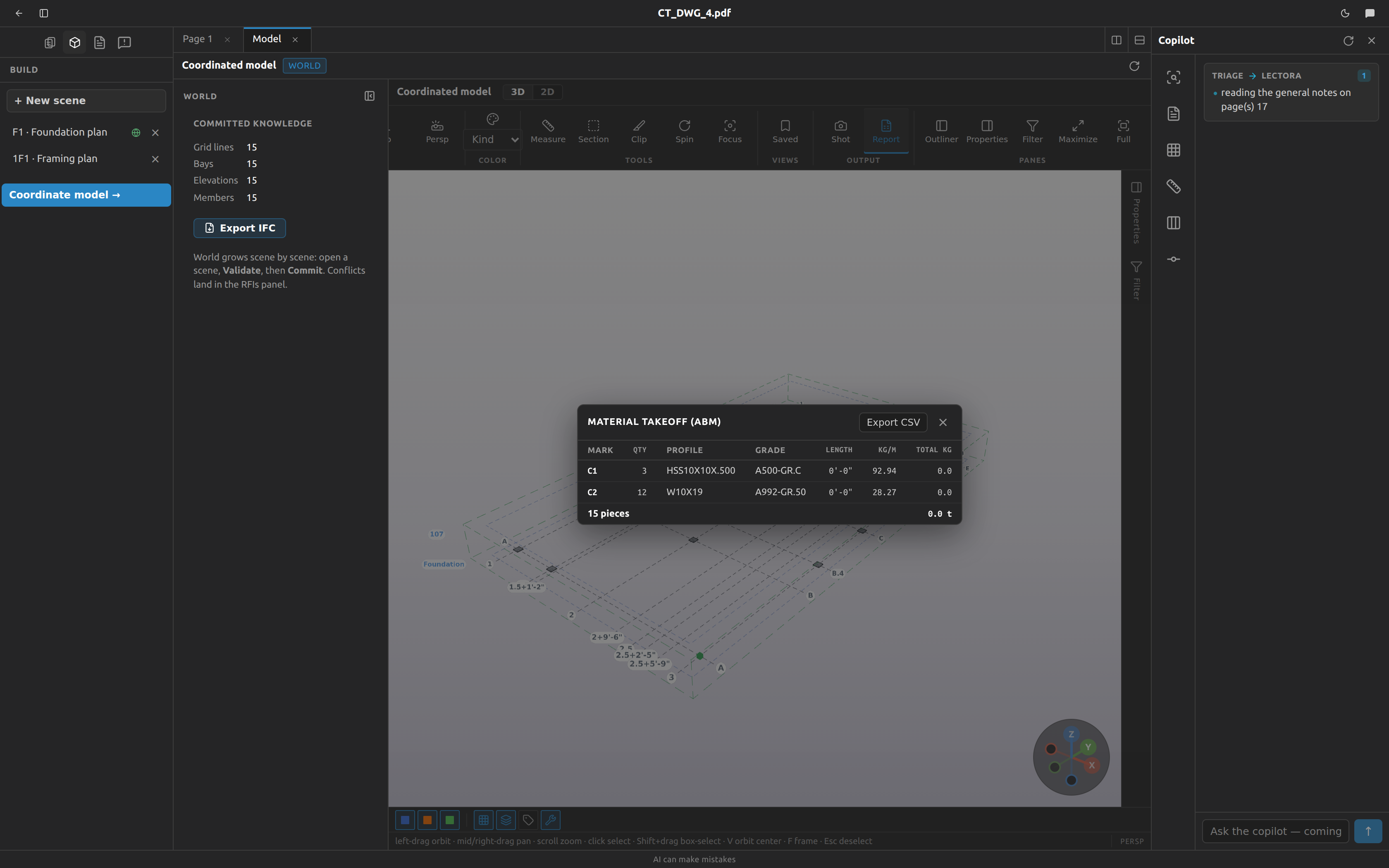
The material takeoff is the advance bill of materials for the whole building: one row per part mark, with quantity, section, grade, length and weight, and a grand total in tonnes. It reads the same coordinated model you see in 3D, so it is never out of date, and it exports to CSV for your own estimating tools.
Open the takeoff
- Open the Model tab from the Structure panel.
- Click Report in the ribbon (tooltip Material takeoff (ABM)).
The report opens as a card over the model. Close it with the × (Close), Esc, or by clicking the backdrop.
Read the table
Rows are mark groups — one row per mark, not one per piece.
| Column | What it holds |
|---|---|
| Mark | The part mark, e.g. B3 |
| Qty | How many members carry that mark |
| Profile | The section designation, or — |
| Grade | The steel grade, or — |
| Length | The group's length in feet and inches |
| kg/m | The catalog unit weight for that section, or — |
| Total kg | kg/m × length × qty, to 0.1 kg — or — |
The footer gives the grand totals: the number of pieces and the total in tonnes. When some marks have no catalog weight, the footer says so as well — "(N marks w/o weight)" — because those marks contributed nothing to the tonnage.
The takeoff always covers the whole building
Hiding members, filtering the model or switching a kind off changes nothing in this report. It lists every member in the world, every time. If you were expecting the takeoff to follow what's on screen, it doesn't — and that's deliberate, since a takeoff of "whatever happened to be visible" is a bad takeoff.
Export it to CSV
Click Export CSV in the report's header. You get a file named <project-id>-abm.csv — e.g. 7-abm.csv; the number is the project's id, not its name. Its header row:
Mark,Qty,Profile,Grade,Length_ft,Unit_kg_per_m,Total_kgTwo differences from the on-screen table, so your spreadsheet can do arithmetic:
- Length is decimal feet to 3 decimal places, not feet and inches.
- The last line is a
TOTALrow. If some marks had no catalog weight, that row's Profile cell carries the noteN marks without catalog weight excluded.
How marks are numbered
Marks are worked out by Fablnx from the model itself — you never type one. Two members get the same mark when all four of these match:
- Kind — beam, column or brace
- Profile designation
- Grade
- Length, rounded to the nearest 1/16″
Length is the full 3D distance between the member's two work points, so a 3-4-5 brace counts as 5 ft, not 4.
The prefix comes from the kind, and each prefix counts independently — so B1, C1 and BR1 all exist in the same model:
| Kind | Prefix |
|---|---|
| Beam | B |
| Column | C |
| Brace | BR |
| Anything else | M |
Within a prefix the numbers follow a fixed sort: beams first, then columns, then braces; then profile designation ascending; then length descending; then grade. In practice that means the longest piece of a section gets the lower number — B1 is longer than B2.
Marks renumber — never use them as an identifier
Marks are recomputed from scratch every time the model changes, and they are not stored anywhere. Because the numbering is positional within a sorted list, committing one extra beam can renumber the beams around it. The B7 in this morning's report may be a different piece this afternoon.
Treat marks as a takeoff aid for reading one report, not as a durable piece identity. Don't write them onto a drawing or into a purchase order and expect them to still match.
What that rounding does in practice
Two members 1/32″ apart in length round into the same 1/16″ bucket and share a mark — a tolerance that matches how you'd actually detail them. A genuine length difference splits the mark and gives you two rows. Members with no profile or no grade are grouped together as "no profile" and "no grade" rather than being dropped.
Marks show up in four places: the mark chip on each leaf of the model tree, the Mark row in properties, the yellow bubbles in 3D (turn on the Marks switch), and the first column of this report.
Why two weight totals disagree
Fablnx shows you two tonnages, and they are not meant to match:
| Where | What it counts |
|---|---|
| The takeoff footer | Every member in the model. Connection plates excluded. Ignores hides, filters and kind switches. |
| Properties dock, nothing selected | Every member plus the connection steel — base plates, shear tabs and gussets. Follows the Connections switch. |
So the properties Weight normally reads a little higher than the report's total. Turn the Connections switch off and it drops to roughly the report's figure.
Which number to use
Use the takeoff for anything you're buying or pricing: it's per-mark, exportable, and counts only real members with catalog weights. Use the properties figure as a quick sanity check on the model, remembering that the connection steel in it is a derived approximation rather than a designed connection, and shouldn't be quoted to a fabricator.
Weigh a selection
Select two or more members in the 3D model and the properties dock gives you a running sub-takeoff: per-kind counts, the total length, the weight in tonnes, the centre of gravity as CoG X / Y / Z in feet and inches, and the list of distinct profiles in the selection.
The centre of gravity quietly changes method
Normally the CoG is weighted by each member's steel weight. But if any one member in the selection has a section that isn't in the catalog, the whole calculation falls back to weighting by length alone — for every member, not just the unknown one. There is no warning on screen.
The Weight row behaves differently again: it simply adds up the weights it has, so a mixed selection can show a tonnage that's short and a CoG that isn't weight-based. Check the profiles list at the bottom of the dock for anything unfamiliar before you trust a lifting point.
Export the model itself
For the geometry rather than the quantities, open the 3D model — it reads the same solved building the takeoff counts. See Levels, Grids and the building.
Where to go next
- The coordinated 3D model — the viewer this report reads from.
- Validation & the world model — how steel gets into the takeoff in the first place.